Fast Charging Explained: Watts, USB PD, PPS and Which Charger to Buy
How phone fast charging really works: watts, USB PD, PPS and brand standards explained, plus the charger and cable to buy for your phone.
Fast charging sounds simple: a bigger number on the box means a faster phone. In reality, how fast your phone charges depends on three things working together: the phone, the charger and the cable. This guide explains fast charging in plain English, from watts and USB PD to PPS and brand standards like SuperVOOC, and shows you exactly which charger to buy for your phone.
The short answer
- The phone decides how fast it charges. A bigger charger can’t force more power into it, so a higher-watt charger is safe but won’t make a slow-charging phone faster.
- For most phones, buy a USB-C charger with USB Power Delivery (USB PD) and PPS that matches or beats your phone’s maximum wattage.
- Samsung and Google Pixel phones need PPS for their top speeds. iPhones fast charge with any USB PD charger.
- Brand standards like SuperVOOC and HyperCharge reach their full speed only with the maker’s own charger and cable. With a regular USB PD charger they still charge, just slower.
- The cable matters above 60 watts: you need a 5A (240W) USB-C cable. A standard 3A cable tops out at 60W.
- Fast charging is fastest at the start. Expect a quick first half and a much slower finish.
What does fast charging mean on a phone?
Charging power is measured in watts (W), and watts are simply volts multiplied by amps. Old phone chargers delivered 5 volts at 1 amp, which is 5W. A basic USB-C port without any fast charging can give up to 15W (5 volts at 3 amps).
Anything above that counts as fast charging. To deliver more power, the charger and phone agree to raise the voltage, the current or both. That conversation happens through a charging protocol, a shared language both devices have to speak. If they don’t share one, they fall back to slow, basic charging.
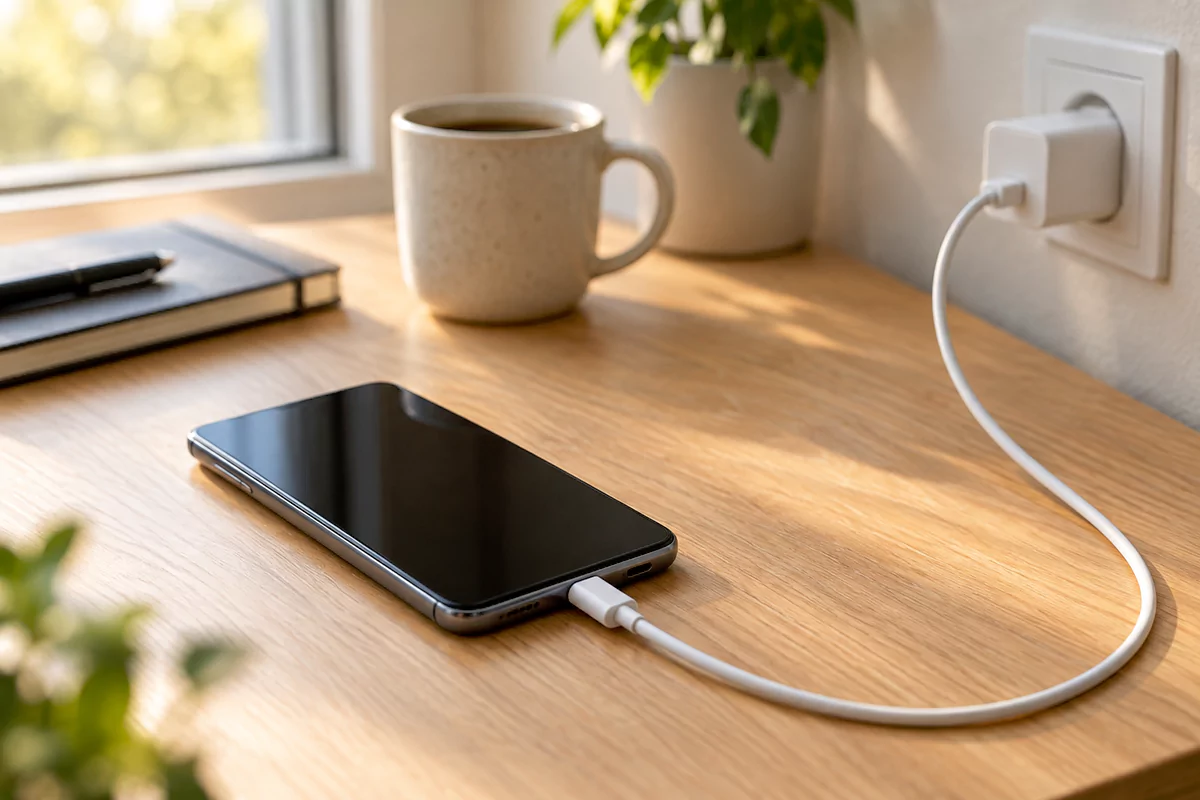
Here’s what the most common power levels mean in everyday use:
| Charging power | What it is | What to expect |
|---|---|---|
| 5–10W | Old USB chargers, slow USB ports | A full charge of a modern phone can take 3 hours or more |
| 15W | Basic USB-C without fast charging | Fine overnight, slow during the day |
| 18–30W | Entry fast charging (USB PD) | The level many iPhones, Pixels and budget phones use |
| 40–60W | Fast charging on many flagships | Roughly half a battery in 20–30 minutes on phones built for it |
| 65–120W+ | Brand standards from Chinese makers | Often a full charge in 20–40 minutes, but usually only with the maker’s own charger |
The wattage on a phone’s spec sheet is its peak, not what it gets for the whole charge. A phone rated at 45W may hit 45W for only a few minutes, then slow down. That’s why two phones with the same number on paper can take very different times to charge. You can compare charging speeds across phones in our Phone Finder using the Wired charging filter.
Why fast charging slows down after 50%
Phone batteries don’t charge at a steady speed. The first part of the charge is the fast part: the battery is low, so it can safely take a lot of current. As it fills up, the phone cuts the power step by step to protect the battery, and the last 20% or so is filled slowly on purpose.
That’s why makers quote figures like “50% in 20 minutes” instead of “full in 40 minutes”. For example, Apple says the iPhone 17 and iPhone 17 Pro models reach about 50% in 20 minutes with a 40W or higher adapter, and Google says the Pixel 10 Pro XL reaches about 70% in 30 minutes with a 45W PPS charger. The last half always takes longer than the first.
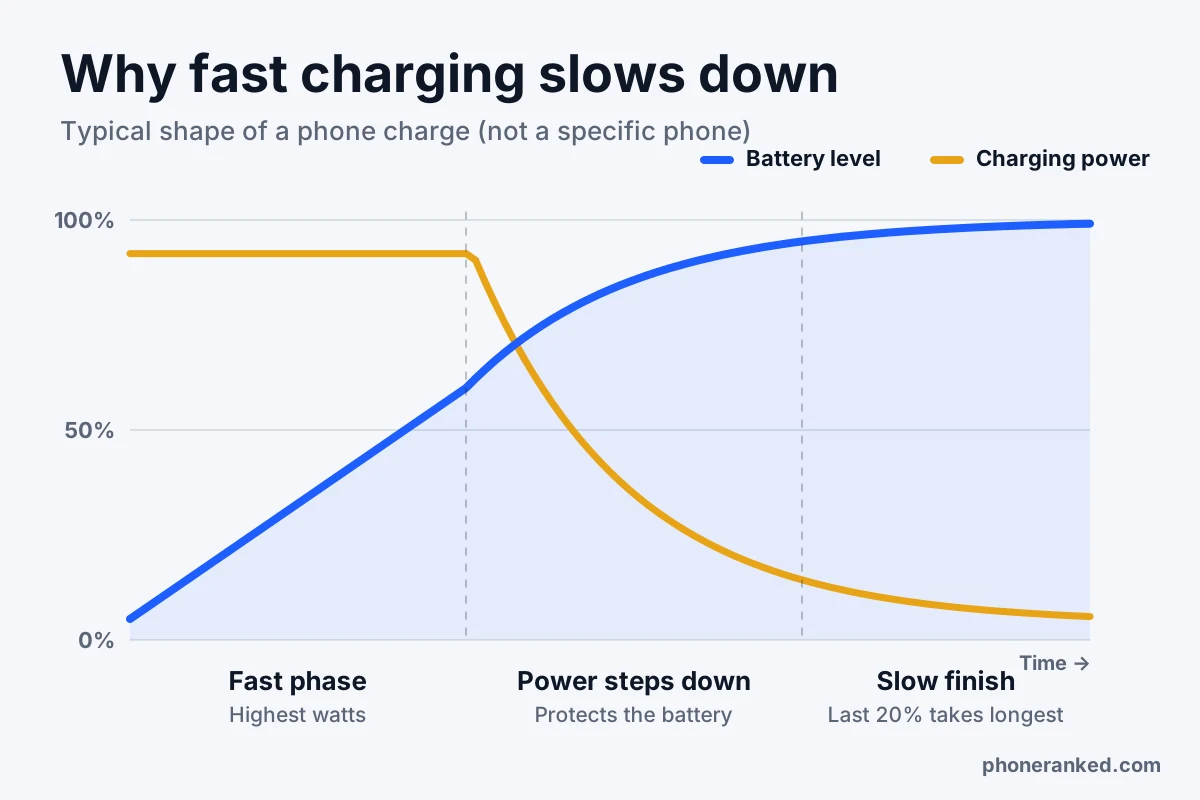
Heat is the other brake. Charging creates heat, and a hot battery charges more slowly. If you charge while gaming, in a thick case or on a sunny car dashboard, your phone may drop to a fraction of its rated speed. Taking the case off and charging somewhere cool really does help.
What is USB Power Delivery (USB PD)?
USB Power Delivery is the universal fast charging standard for USB-C. It’s built into iPhones, Pixels, Samsung Galaxy phones and almost every recent Android phone, as well as laptops, tablets and game consoles. One good USB PD charger can power all of them.
When you plug in, the charger tells the phone what it can offer, the phone picks what it needs, and only then does the power go up. That’s why a USB PD charger is safe to use with any USB-C device: nothing gets more power than it asks for.
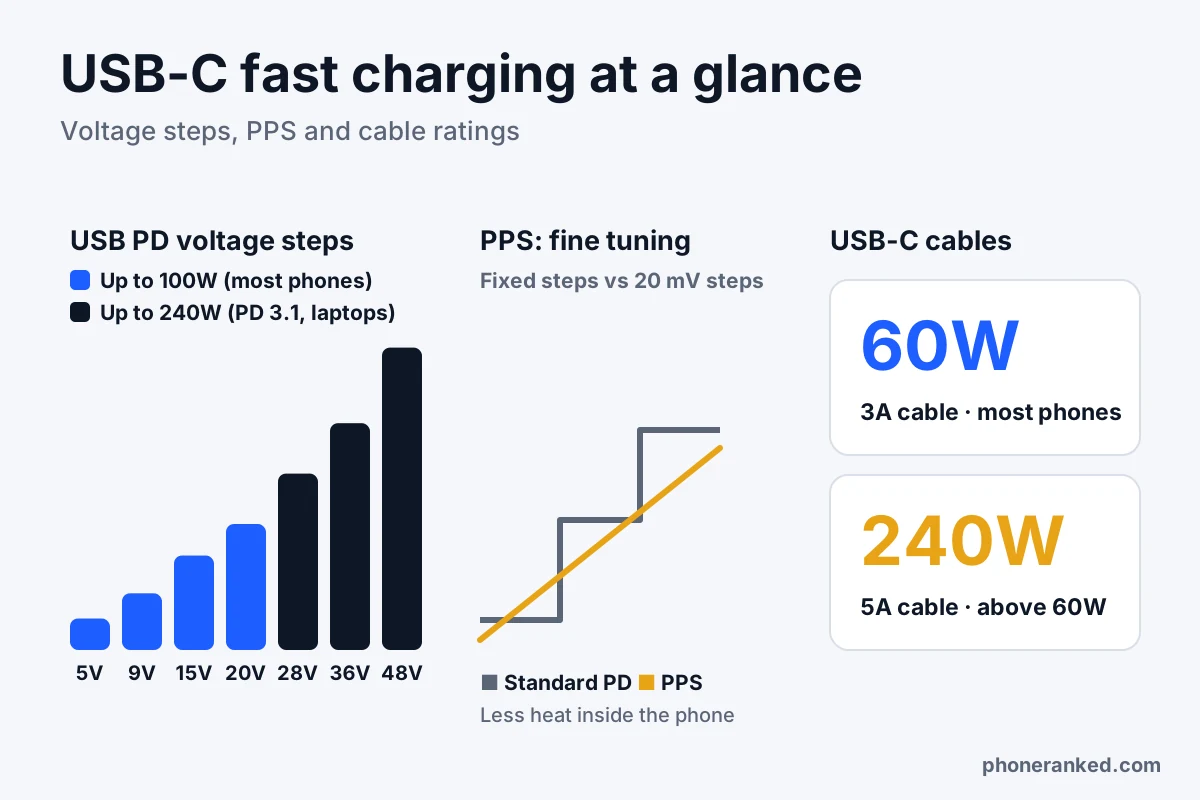
Classic USB PD uses a few fixed voltage steps: 5, 9, 15 and 20 volts, for up to 100W. The newer USB PD 3.1 adds an Extended Power Range (EPR) with 28, 36 and 48 volts for up to 240W. That’s aimed at laptops and monitors, not phones, which today sit well below 100W.
USB PD is also the law in the EU. Since December 28, 2024, phones sold there must charge over USB-C, and any phone that charges faster than 15W must support USB PD. Brands can add their own protocols on top, but a standard USB PD charger has to work with every new phone.
What is PPS, and does your phone need it?
PPS (Programmable Power Supply) is an optional part of USB PD. Instead of jumping between fixed steps like 9V and 15V, a PPS charger can adjust its voltage in tiny steps of 20 millivolts, many times per second, following exactly what the battery needs at that moment.
Why does that matter? With a fixed voltage, the phone has to convert the power itself, and that conversion turns into heat inside the phone. With PPS, the charger does the fine-tuning, so the phone stays cooler and can keep charging fast for longer.
- Samsung Galaxy: Super Fast Charging (25W) and Super Fast Charging 2.0 (45W) need a PPS charger. Without PPS, a Galaxy phone falls back to much slower charging even on a powerful USB PD charger. The 45W mode also needs a 5A cable.
- Google Pixel: Pixels charge fastest with PPS chargers, and Google quotes its charging times with PPS.
- iPhone: iPhones fast charge with standard USB PD and don’t need PPS. A PPS charger works with an iPhone too, since every PPS charger also supports regular USB PD.
Our advice: buy a charger with both USB PD and PPS. It costs little or nothing extra, and it covers almost every phone, now and when you switch brands. Look for “PPS” in the product listing or on the charger itself; if it isn’t mentioned, assume it isn’t there.
SuperVOOC, HyperCharge, Quick Charge: what are brand charging standards?
Many Chinese phone makers built their own fast charging systems before USB PD caught up, and they still use them for their fastest speeds:
| Standard | Used by | What you need for full speed |
|---|---|---|
| SuperVOOC / SUPERVOOC | OPPO, OnePlus, realme | The brand’s own charger and cable |
| HyperCharge | Xiaomi, REDMI, POCO | Xiaomi’s own charger and cable |
| FlashCharge | vivo, iQOO | vivo’s own charger and cable |
| SuperCharge | HONOR, Huawei | The brand’s own charger and cable |
| Quick Charge | Chargers and phones with Qualcomm Snapdragon chips | A Quick Charge charger; newer versions also work with USB PD |
These systems are how some phones reach 80W, 100W or even more. The catch is that the top speed usually works only with the charger and cable from the same brand, often with a special cable. Plug the same phone into a regular USB PD charger and it still charges, usually at a noticeably lower speed.
Before you buy a phone for its huge charging number, check two things: is that charger in the box, and how fast does the phone charge with a standard USB PD or PPS charger? Some brands list this as “PD” or “PPS” wattage in their specs.
Does fast charging damage your battery?
Fast charging on its own isn’t what wears out a battery. Heat is the main enemy, along with time spent at 100% and the number of charge cycles. Phones are designed for their own fast charging: they watch the battery temperature and cut the power when things get warm, and they slow down near full for the same reason.
Very high charging speeds do produce more heat, which is why makers of 100W+ phones split the battery into two cells, add heat sensors and push the power conversion into the charger. If you don’t need speed, a slower charge is gentler, and many phones let you turn fast charging off or limit charging to 80% in the battery settings.
In short: use fast charging when you need it, avoid charging in heat, and don’t worry about the charger’s number. How battery aging works and what really slows it down is a bigger topic, covered in our guide to phone battery health.
Does the cable matter for fast charging?
Yes, and it’s the most common reason fast charging “doesn’t work”. A USB-C to USB-C cable is rated for either 3 amps or 5 amps:
- 3A cables carry up to 60W. That’s enough for most iPhones, Pixels and Samsung’s 25W mode.
- 5A cables have a small chip inside (an e-marker) that tells the charger it’s safe to send more current. They carry up to 100W on older cables or 240W on new ones, and you need one for Samsung’s 45W mode and other high-current charging.
Certified cables now carry a clear label from the USB standards group: 60W or 240W. If a cable has no rating at all, assume it’s a 3A (60W) cable. For brand standards like SuperVOOC, use the cable that came with the phone, because the top speed often depends on it.
Cable quality matters too. Very long, thin or worn cables lose more power along the way. A short, certified cable from a known brand is the safest bet, especially for charging above 30W.
How to choose a fast charger for your phone
Most new phones from Apple, Samsung and Google come without a charger, so sooner or later you’ll buy one. Follow these steps:
- Find your phone’s maximum wired charging speed. It’s listed in the specs on every phone page on PhoneRanked, along with whether a charger comes in the box.
- Check which protocol it uses. Samsung and Pixel: USB PD with PPS. iPhone: USB PD. OPPO, OnePlus, Xiaomi, vivo, HONOR: the brand’s own charger for full speed, USB PD with PPS for everything else.
- Pick a charger at or above that wattage. A 45W charger on a 25W phone is fine; the phone takes only what it needs. Going higher also future-proofs you for your next phone.
- Check per-port power on multi-port chargers. A “65W” charger with three ports may give your phone only 20–30W when a laptop is plugged in at the same time. The listing should show what each port gets.
- Get the right cable. 3A (60W) is enough for most phones; buy 5A (240W) for anything that charges above 60W or needs more than 3A, like Samsung’s 45W mode.
- Choose a trusted brand. Cheap no-name chargers can skip safety protections and often lie about wattage. GaN (gallium nitride) chargers are smaller and run cooler than older designs at the same power.
Here’s a simple cheat sheet:
| Your phone | Charger to buy | Cable |
|---|---|---|
| iPhone | USB-C PD, 30W or more (40W for the newest models’ top speed) | USB-C to USB-C (USB-C to Lightning for older iPhones) |
| Samsung Galaxy (25W) | USB PD with PPS, 25W or more | 3A (60W) |
| Samsung Galaxy (45W or more) | USB PD with PPS, 45W or more from one port | 5A (240W) |
| Google Pixel | USB PD with PPS, 30W or more (45W for the fastest Pro models) | 3A (60W) or better |
| OPPO, OnePlus, Xiaomi, vivo, HONOR | The brand’s own charger for full speed; USB PD with PPS as a backup | The cable from the box |
| Several devices, including a laptop | Multi-port GaN USB PD charger, 65–100W total | 5A for the laptop |
If battery life is high on your list when choosing a new phone, our ranking of phones with the best battery life scores charging speed together with capacity. And if you’re comparing battery sizes, see our guide to phone battery capacity (mAh).
Quick answers
Can I use a higher-watt charger than my phone supports?
Yes. With USB PD, the phone asks for the power it needs and the charger supplies only that. A 100W charger is just as safe for a 20W phone as a 20W charger.
Can I charge my phone with a laptop charger?
Yes, if it’s a USB-C charger with USB PD. Many laptop chargers also support PPS, which makes them a good one-charger solution for a laptop and a phone.
Why does my phone say it’s charging but not fast charging?
Usually the charger lacks the right protocol (often PPS for Samsung), the cable is rated too low, a multi-port charger is sharing power, or the phone is too warm. Try the charger’s single port, a known good cable and a cooler spot.
Is wireless charging as fast as wired?
Usually not. Most phones charge more slowly and get warmer on a wireless pad than on a good USB-C cable, so wired charging is the fast option.
Is 25W charging fast?
Yes, it counts as fast charging and is enough for most people. It typically fills roughly half a battery in about half an hour, which covers a day of normal use when you top up in the morning.
Do new phones still come with a charger?
Many don’t. Apple, Samsung and Google ship most phones with just a USB-C cable, while some other brands still include a fast charger. Each phone page lists whether a charger is in the box, and you can filter for it in the Phone Finder.